Optional Custom Elements: When Plain Writing Needs More
A visual example of what Lily pastes into Pages CMS and what readers see on the finished website.
Most pages should remain ordinary writing. A custom element is only for a place where a rating, button, comparison, gallery, or another visual treatment would make the page more useful.
The important idea is simple: Olof builds the element. Lily receives a short snippet and places it in the article.
What it looks like in Pages CMS
The article body contains normal writing and the custom snippets in the same editor. Lily does not create these snippets from memory. Olof provides the exact text and explains which values can be changed.
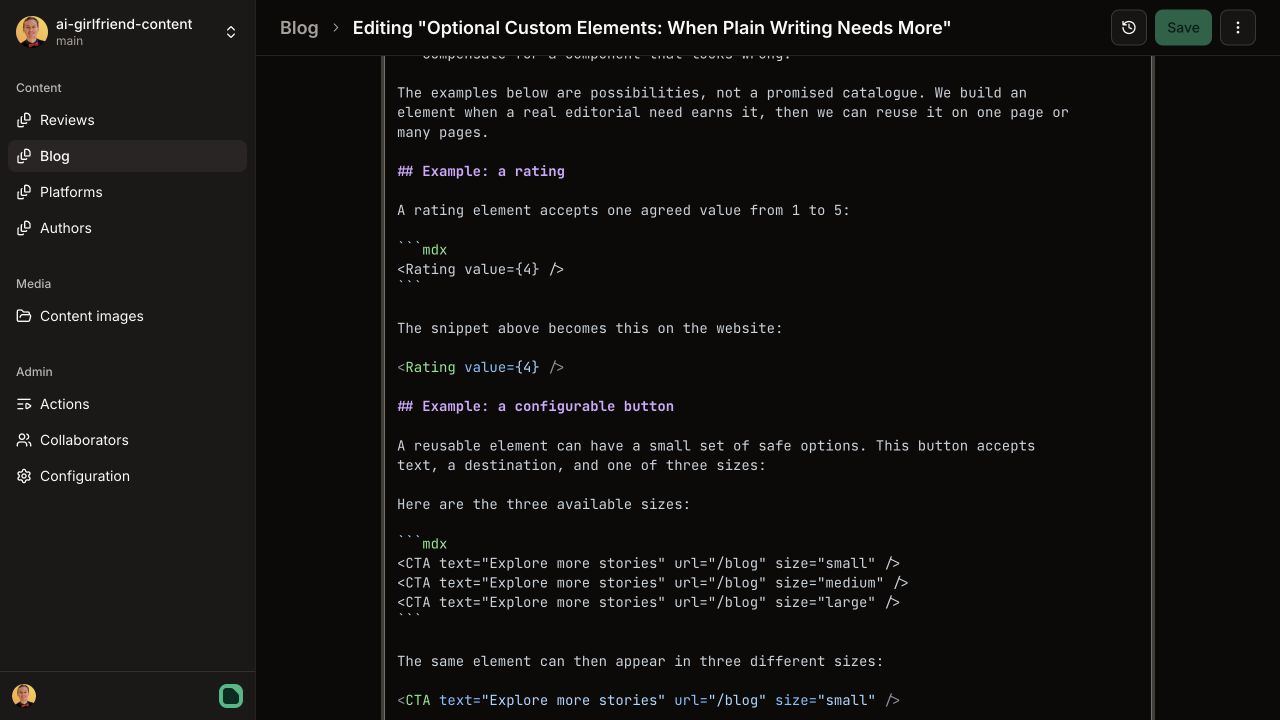
The screenshot is an example of how these snippets sit between ordinary sections. The exact words and settings can change from one article to another.
What readers see on the website
The website turns each snippet into the element Olof designed. Pages CMS shows the instructions; the website shows the result.
Example 1: a rating
What Lily pastes into Pages CMS:
<Rating value={4} />What readers see:
Changing 4 to 3 or 5 changes the rating. Nothing else needs to be edited.
Example 2: a button
What Lily pastes into Pages CMS:
<CTA
  text="Explore more stories"
  url="/blog"
  size="small"
/>

<CTA
  text="Explore more stories"
  url="/blog"
  size="large"
/>
What readers see:
Here Lily can change the button text, destination, and agreed size. Olof owns how each version looks and behaves on phones and computers.
Other things we could build
These are examples of the kinds of elements the system can support. They are not a fixed catalogue that every article should use.
The pros
- Makes key information easy to scan
- Uses the same design wherever it appears
The cons
- Only worth using when it improves the page

Image 1 of 2
Who does what
- Lily explains what the reader should experience, places the supplied snippet, changes the agreed values, saves, and checks the finished page.
- Olof builds the element, supplies the snippet, and fixes its design, responsiveness, or rendering if anything looks wrong.
Start with plain writing. Ask for a custom element only when it would genuinely make the page clearer, more visual, or more useful.